
Things needed to Launch Your Mobile App.
Launching your mobile app with Apploy is simple. Follow the steps below to ensure everything is ready. Our team will guide you through the process and help at every stage.
Updated
This doc will help you with launching your new app or migrating your existing app to Apploy. You can transfer your existing apps to Apploy and retain all the installs on Android and iOS both. Contact us for more information.
1. Install Apploy App Builder
- Go to the Shopify App Store and install Apploy App Builder on your Shopify store.
- Once installed, you’ll see the Apploy dashboard inside your Shopify admin panel.
2. Select Plan & Activate Free Trial
- Review our available plans and select the one that suits your needs.
- Activate your free trial to start building your mobile app right away.
3. Set Up Developer Accounts
To publish your app on iOS and Android, you’ll need:
-
Sign up for Apple Developer Account(iOS)
-
Sign up for Google Play Console Account (Android)
Organization account
👉 Please create both accounts and add [email protected] as admin to both accounts.
Individual account
👉 Please create both accounts and share credentials with us privately by initiating a chat.
4. Create Firebase Account
Firebase is required for app services like push notifications and automated builds.
- Create a Firebase Account at firebase.google.com.
- Create a Firebase project in your account.
- Add our team email([email protected]) as an owner so we can automate the builds.
5. Delete Account Form
As per Apple and Google policy update, any app that allows account creation must also provide an option to delete the account from within the app. This form will be shown in your app’s account section to meet this requirement.
- Please make a copy of the form from the link below and share the public URL with our team: 👉 https://docs.google.com/forms/d/1Q0D99qi5OUFsGqdB6BjEsoLymkBHZqnukpuJDqpStqI/copy
- Rename the doc and publish it.
- Copy the URL
- Open Apploy > Distribute > Store Listing
- Paste the URL in the Delete account form link field.
- Save the Store listing.
6. Complete Store Listing in Apploy Dashboard
Fill out the app listing details directly in your Apploy dashboard:
- App Name
- Short & Full Description
- Contact Email & Phone Number
- Keywords (for search visibility)
- Privacy Policy link
- Contact Person details
- Delete account form URL (Step 5)
These details will appear on both Google Play Store and Apple App Store.
7. Prepare Branding & App Assets
Make sure you have the following ready:
- Brand Logo (high resolution, square)
- Splash Screen (startup screen for the app)
- Featured Graphic / Banner
- App Store Screenshots (we’ll help capture these during testing)
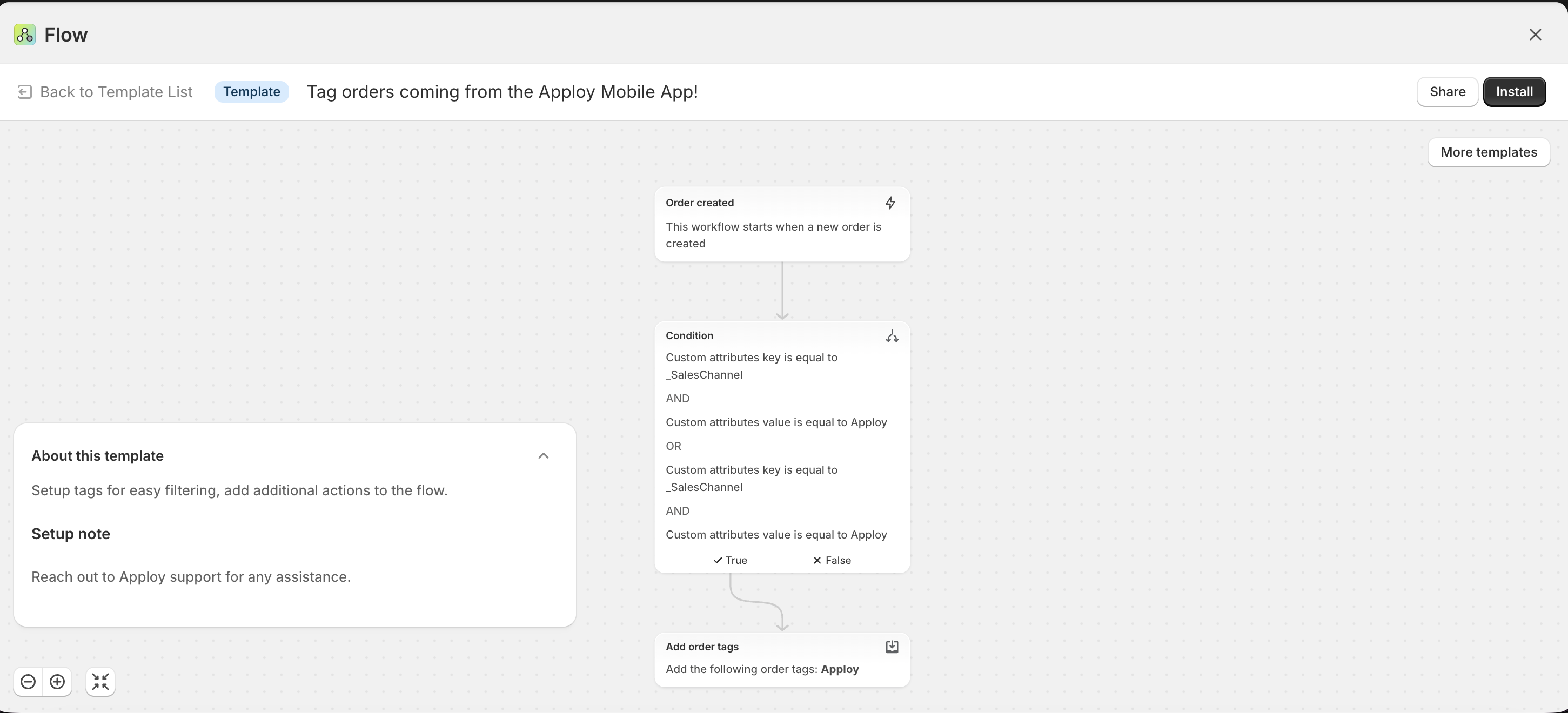
8. Apploy order tagging
Install the workflow to automatically tag the orders coming from Apploy
- Click on this link https://shopify.com/admin/apps/flow/editor/templates/01998613-c5e7-731b-94b1-1a88b2f201e6
- Click on install
- Turn on the workflow
9. Our Team’s Role
We will:
- Guide you through account creation and access sharing
- Set up Firebase and app store integrations
- Ensure all listing details are complete and compliant
- Upload and publish your app on Google Play Store and Apple App Store
Final Checklist
- Installed Apploy App Builder
- Activated free trial
- Apple Developer Account created + access shared
- Google Developer Account created + access shared
- Firebase account created + access shared
- Store listing details filled in Apploy dashboard
- Branding assets ready (logo, splash screen, featured graphic, screenshots)
- Shopify flow automation setup for order tagging
Need help? Our team is available to work closely with you to finish everything smoothly.