
Using Discount & Promo QR Codes
Create QR codes that automatically apply discount codes during checkout and display custom promotional messages using announcement banners.
Updated
What are Discount & Promo QR Codes?
Discount & Promo QR Codes allow you to offer seamless promotions to your customers. When scanned, these QR codes automatically apply a discount code at checkout, removing the friction of manual code entry. Additionally, you can show a custom announcement banner to highlight the promotion or share a personalized message.
Why Use Discount & Promo QR Codes?
- Boost Conversions: Customers don’t need to remember or type discount codes.
- Promote Offline Campaigns: Perfect for flyers, posters, packaging, and events.
- Highlight Special Offers: Display custom banners with promotional messages when the QR code is scanned.
- Simplify Repeat Campaigns: Reuse QR codes for recurring seasonal or loyalty discounts.
How to Create a Discount & Promo QR Code
-
Log in to your Super QR Codes dashboard.
-
Click on Create New QR Code.
-
Select the type of QR code you want to create (Product, Cart, Website, etc.).
-
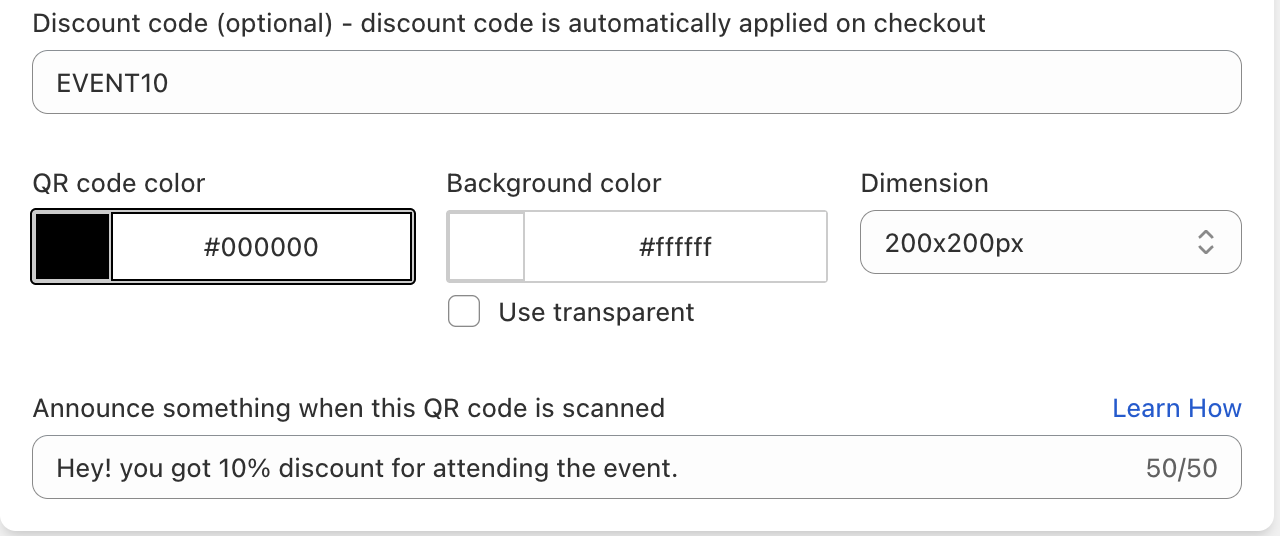
In the Discount code field:
- Enter your desired Discount Code (must already exist in your Shopify admin).
- Optionally, add a Custom Announcement Banner Message that will show when the code is scanned. The announcement banner must be enabled on your theme.
-
Customize the QR design (colors, logo, frames).
-
Click Save QR Code.
Example Use Cases
- Event Promotions – Hand out flyers with QR codes that apply EVENT20 discount automatically.
- In-Store Campaigns – Place posters with QR codes that display “Flash Sale – 10% Off Today Only!” in the announcement banner.
- Packaging Inserts – Add QR codes on packaging that apply a loyalty discount for repeat customers.
- Seasonal Campaigns – Share QR codes online or offline for holiday promotions.
Best Practices
- Always Test First: Scan your QR code to confirm the discount applies correctly.
- Keep Codes Simple: Use short, easy-to-remember discount codes.
- Make Banners Clear: Keep your announcement message concise and attention-grabbing.
- Track Performance: Use UTM tracking to measure campaign success in Google Analytics.
By using Discount & Promo QR Codes, you can increase conversion rates, delight customers, and make your marketing campaigns more impactful.