
Using QR Codes for Cart
Use pre-filled cart QR codes to enable bundling, promotions at events, stock clearance, repeat orders, and much more.
Updated
What is a cart QR Code?
A pre-filled cart QR code lets you create a QR code that, when scanned, automatically adds selected products to the customer’s shopping cart. This is extremely useful for running promotions, offering bundles, and simplifying the shopping experience.
For example:
- Bundles: Sell a set of complementary products together.
- Event promotions: Place QR codes at an event booth to let customers quickly grab the promo pack.
- Stock clearance: Pre-load slow-moving items into the cart and push them with discounts.
- Repeat orders: Let returning customers reorder their favorite set of products with a single scan.
How to Create a Pre-Filled Cart QR Code
-
Go to Super QR Codes dashboard.
-
Select Create New QR Code.
-
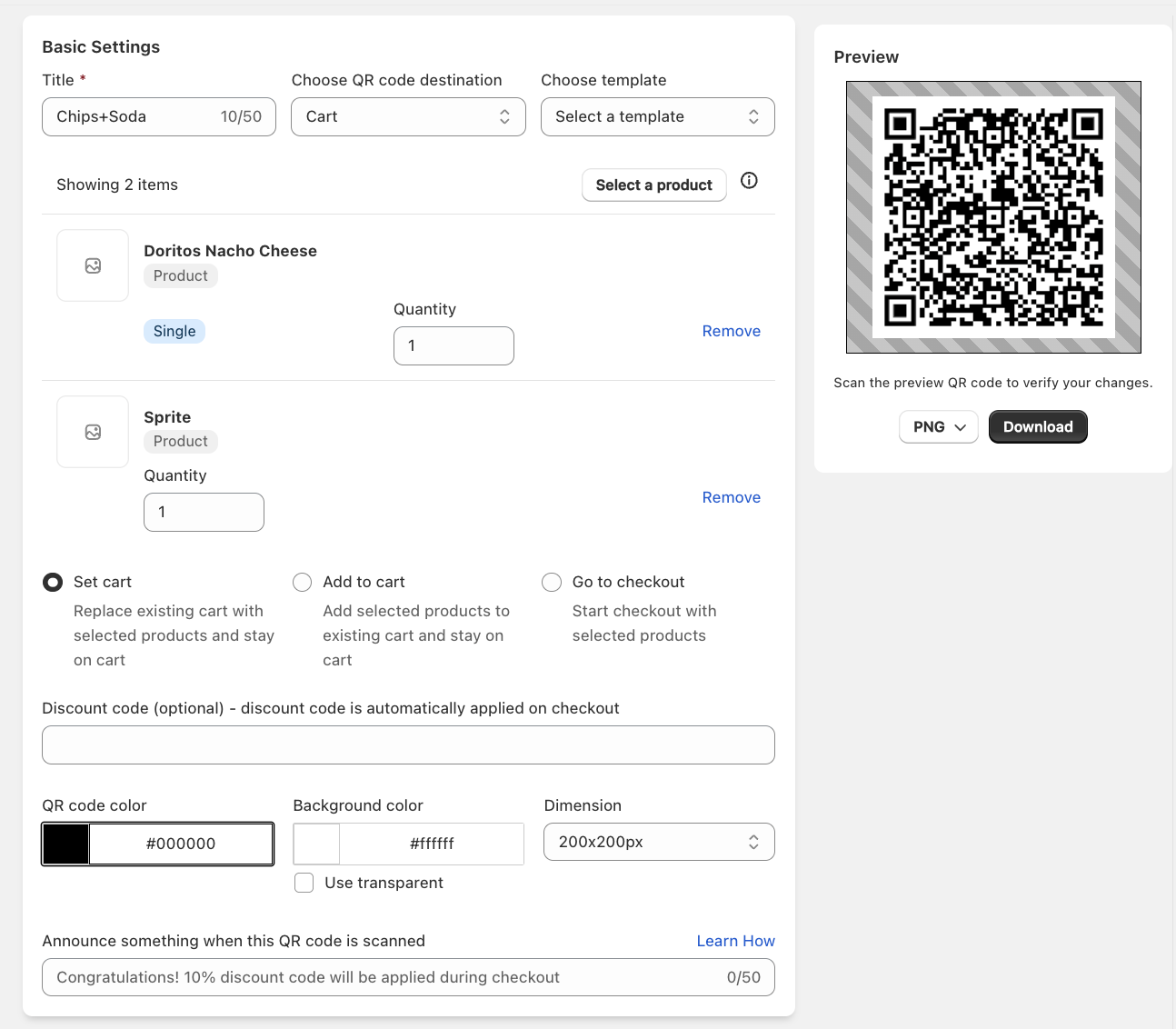
Choose the Cart option from the destination dropdown.
-
Add the products you want to include in the pre-filled cart:
- Search for products from your store.
- Specify quantity for each product.
-
Once products are selected, Save the QR code.
Advanced Options
- Discount Code: You can attach a discount code to the pre-filled cart so customers automatically see the promotion applied.
- Redirection: Choose what to do when the QR code is scanned, you can replace customer's existing cart, add new products to cart and also directly redirect to checkout.
- Design & Branding: Customize the QR code design to match your brand using the Advanced styling options.
Example Use Cases
- Bundle Sale – Create a QR code that adds a "Summer Skincare Pack" (cleanser, toner, moisturizer) into the cart.
- Event Freebie – Distribute QR codes at a conference that adds free merchandise or samples to the cart.
- Clearance Campaign – Generate a QR code for items going out of stock and share it via flyers or packaging.
- Subscription Reorders – Print QR codes inside product packaging to let customers reorder the same bundle quickly.
Measuring Success
Pair your pre-filled cart QR codes with UTM tracking to measure performance in Google Analytics. This way you can:
- Track how many carts were initiated from QR scans.
- Measure conversion rates from QR-driven campaigns.
- Compare results across bundles, events, or promotions.
Best Practices
- Test Before Sharing: Always scan and verify the cart contents before distributing.
- Use Clear Labels: Add a small description or CTA (e.g., "Scan to get the Summer Pack"). Create a custom template using our template builder.
- Segment Campaigns: Use different QR codes for different campaigns to measure performance.
By using cart QR codes, you make shopping effortless, reduce friction at checkout, and increase conversions for bundled promotions, events, and repeat orders.